Infrastructure automation is built on two decisions that determine whether changes land safely, consistently and predictably across environments:
- Which nodes should this automation target?
- What configuration should those nodes apply and in what form?
These questions sound simple, but they operate at completely different layers of the system.
The Progress Chef 360 platform addresses both concerns by providing intelligence on where automation should execute and what configuration should be applied, allowing targeting and configuration to remain aligned as environments shift. The two Chef features that help you do that:
- Node Filters (on the Chef 360 platform) decide where automation should run by dynamically selecting nodes based on real-time attributes.
- Run-Lists and Policyfiles (Configuration Management- Chef Infra) decide what configuration runs on those nodes and how it is applied and versioned.
Understanding this separation is crucial for building automation that remains reliable as environments evolve and change.
Node Filters — The “Where” Automation Runs
Node Filters on the Chef 360 platform answer the question:
“Where should this automation run?”
Since modern environments are dynamic, they have been designed to address this dynamicity. Node Filters on the Chef 360 platform automatically select the right machines based on real-time attributes, adjusting seamlessly as nodes appear, disappear or change.
What Node Filters Can Match
- Operating system
- Environment (Prod, Staging, QA, etc.)
- Roles or run-list content reported by Chef Infra
- Cloud provider metadata collected via Ohai (AWS, Azure, GCP)
- Tags and custom node attributes
- And more…
Instead of relying on a static list of hosts, a Node Filter can express intent such as:
“Select all nodes in the production environment that have the web-server role.”
This means the filter automatically adjusts as nodes are added, removed or attributes are changed, enabling the platform to target the right machines always.
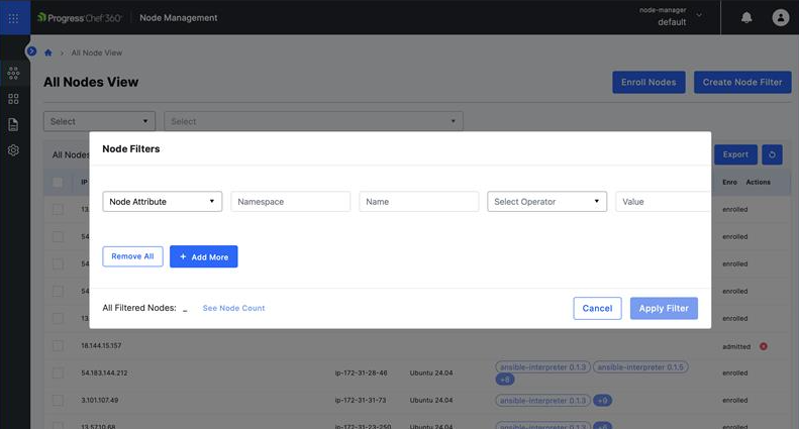
To create node filters, follow these steps:
1. Select Create Node Filter.
2. Choose the filter category you want to create in the first drop-down. The fields that appear will change based on the category selected:
- Node Attribute: Enter the Namespace, and Name, select an Operator from the drop-down and enter the Value.
- Skill: Enter the Skill Name, and Skill Type, select an Operator from the drop-down and enter the Version.
- Enrollment Level: Select an Operator and Enrollment Level from the drop-down.
- Node Health Status: Select an Operator and a Node Health Status from the drop-down.
3. Select +Add More to add more filters.
4. Select Apply Filter.
To dive deeper into how Node Filters work, check the Courier Node Filters documentation.
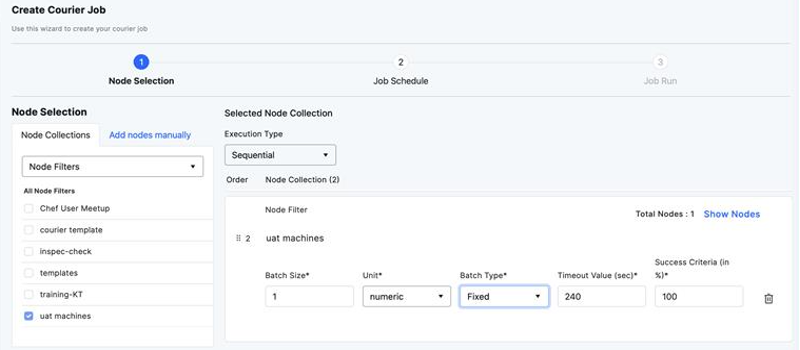
This Node filter can then be used on the Courier Job Creation page to define which nodes the job will run on.
Run-Lists — The Original “What to Run” (Chef Infra)
Before Policyfiles, Chef Infra (the Chef engine that runs configuration management) relied on run-lists to define what actions a node performed during a converge: a simple, ordered list of roles and recipes.
It worked but had one drawback: no version locking.
Any cookbook update on the server could affect nodes unpredictably, introducing drift across environments. That problem led directly to the creation of Policyfiles.Run-List Syntax
Example:
$ Recipe [COOKBOOK::RECIPE], COOKBOOK::RECIPE, role [NAME]Example Run-List

To learn more about how run-lists structure configuration flow, check the Chef Infra Run-List documentation.
Policyfiles — The “What” and “How” Behind Configuration
Once the right nodes are selected, the next challenge is determining which configuration they should run and how to confirm they all run the same thing in the same way.
This is exactly what Policyfiles solves.
Policyfiles were introduced to address long-standing operational challenges, including drift between environments, cookbook version mismatches, unpredictable dependency behavior and difficulty in promoting changes safely. It addresses the question:
“What should run on these nodes, and how do we guarantee consistency?”
A Policyfile defines:
- Run-list
- Cookbook version locks
- Dependency graph
- Attributes
- Source locations
- A generated lockfile (Policyfile.lock.json)
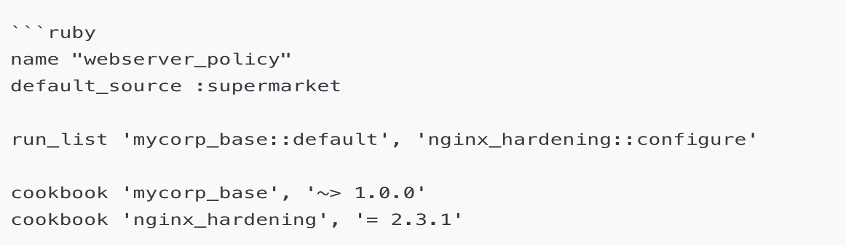
A Policyfile Example
A Lockfile Example
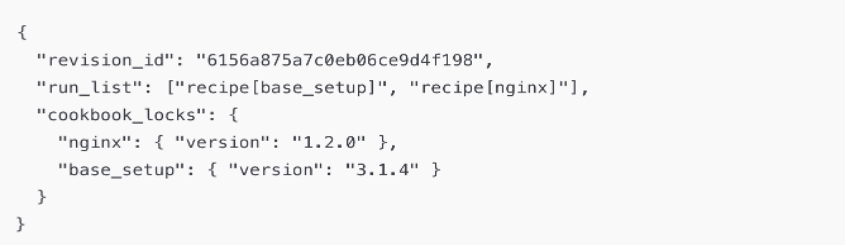
Lockfiles freeze versions so nodes never drift to newer cookbook releases unexpectedly.
To create a Policyfile, follow these steps:
- Create a file called Policyfile.rb. In this file, you must write what the policy is named, and which recipes should run on the node.
Define the Policy (example)
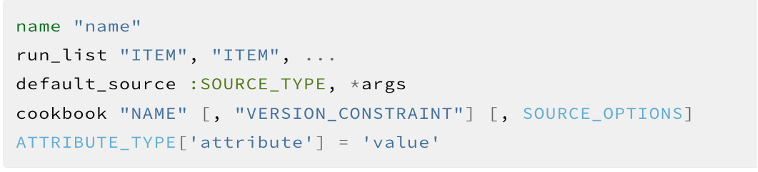
Resolve dependencies and generate the lockfile:
$ chef install Policyfile.rb
- This resolves cookbooks, caches them locally in Chef Workstation, and emits Policyfile.lock.json.
Push the locked policy to the server (assign to a policy group):
$ chef push <POLICY_GROUP> Policyfile.lock.json
pushuploads the lockfile and the cookbooks it contains and applies that lock to the named policy group
Assign the policy (and group) to a node:
$ knife node policy set<NODE_NAME> <POLICY_GROUP> <POLICY_NAME>
Converge nodes
- When the node runs
chef-client(or is bootstrapped with the policy), it uses the lockfile-defined cookbooks and versions, guaranteeing consistent, reproducible converges.
For a detailed walkthrough of Policyfiles and their workflow, explore the Policyfile documentation.
How Node Filters, Run-Lists and Policyfiles Work Together
Even though they serve different purposes, the workflow is simple:
| Aspect | Node Filters | Run-Lists | Policyfiles |
| Responsibility | Where automation runs | Order of configuration steps | What runs + exact cookbook versions |
| Nature | Dynamic, query-based | Static and ordered | Version-controlled, reproducible |
| Evaluated at | Execution time | During converge | When policy is installed/updated |
| Guarantee | Accurate targeting | Correcting sequencing | Consistent behavior across nodes |
| Scope | Infrastructure-wide | Node-level | Policy or environmental-level |
| Change frequency | Changes often as inventory/attributes evolve | Changes when the configuration flow is redesigned | Changes via deliberate releases/promotions |
| Source of definition | Defined and managed in Chef 360 | Defined on the node or via roles in Chef Infra | Defined as code in Policyfile.rb in VCS |
| Primary use case | Selecting target nodes for actions (scans, patches, runs) | Orchestrating recipes for a single node | Locking and promoting consistent configurations |
Example:
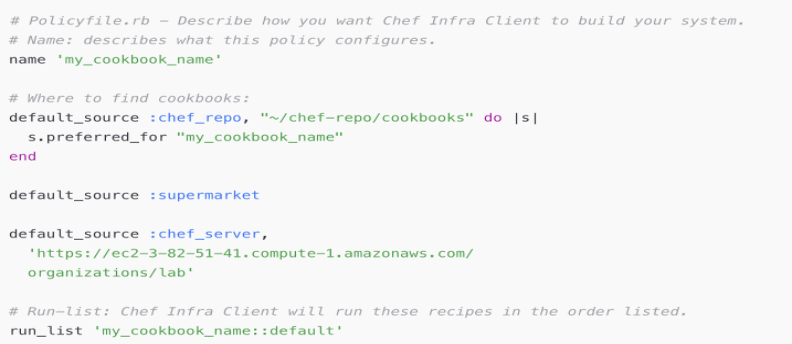
What this Policyfile does:
Name 'my_cookbook_name'gives the policy a human-readable identity the name you’ll refer to when applying the policy.- The
default_sourceblocks tell Chef where to resolve cookbooks from. In this example we declare three sources: - a local
chef_repo(useful during development) and mark itpreferred_for"my_cookbook_name"so Chef will prefer the local copy for that cookbook; supermarket(public community cookbooks)- a private
chef_server(your organization’s server). This setup lets you develop locally while still resolving dependencies from the community or your internal server as needed. Run_list 'my_cookbook_name::default'defines the single recipe to run recipes are executed in the order they appear in the run-list.
How you use it:
1. Save this file as Policyfile.rb in your project.
2. Run chef install these resolves cookbook versions and generates Policyfile.lock.json. The lockfile contains the exact cookbook versions and dependency graph.
3. Push the locked policy to a policy group:
$ chef push <POLICY_GROUP> Policyfile.lock.json
4. Apply the policy on a node (or converge locally) using the policy name and group:
$ knife node policy set<NODE_NAME> <POLICY_GROUP> <POLICY_NAME>
Each node that uses this policy will now pull the exact cookbooks/versions described in the lockfile and converge deterministically.
Bringing It All Together
Node Filters define the right targets, run-lists define the right order, and Policyfiles guarantee the right versions. Together, they give teams a consistent and scalable automation model that minimizes drift and supports reliable operations at any scale.
Chef integrates these capabilities into a unified approach, enabling organizations to manage infrastructure with greater predictability, governance and long-term stability.
Ready to try this yourself? Start a Chef Trial and experience how Chef enables consistent, scalable automation.