
Modern IT teams are tasked with automating infrastructure while maintaining strong security, governance and operational standards. Progress Chef DevOps primarily recommends agent-based automation, as it provides a secure, scalable and policy-driven model for continuous configuration management.
However, some environments present constraints where installing an agent may not be feasible. Certain regulated systems may restrict additional software installation, legacy or unsupported operating systems may not support current agents and highly controlled environments may require alternative management approaches. In these scenarios, the Chef solution lets you extend automation without losing control.
The Chef platform enables agentless execution by leveraging secure transport protocols to execute resources directly on remote systems from a designated control point. A system with Chef 15 or higher installed is called a Chef host. In agentless mode, this host can manage target systems without requiring a Chef Client installation on those nodes.
This approach enables:
- No extra software footprint on sensitive systems
- Faster onboarding for hybrid environments
- Centralized execution
- Policy and event-driven automation
- Support for edge and air-gapped environments
- Rapid experimentation
- Low operational cost
Agentless automation is ideal for quick fixes, seamless hybrid management and on-demand jobs, where an agent cannot be installed. It functions as a secure and streamlined remote execution pipeline by following the steps below:
- Chef Host (Chef Client) processes the cookbook/resources and converts them into executable steps on the target system using the selected transport protocol (such as SSH and WinRM).
- Changes are applied to the target node through a protocol (example: SSH & WinRm(upcoming)).
- Optionally, the compliance dashboard of Chef Automate can display audit and governance results, giving teams visibility into configuration and compliance status.
Key Capabilities
- Works in local mode using Chef Zero, an in-memory Chef server for testing and development.
- Ideal for legacy systems, edge devices and regulated environments.
- Unified visibility for agent-based and agentless nodes.
Scenario: Agentless Automation with Chef: Deploy Webpages and Scale Across Multiple Nodes
In this example, we will outline how to install a web server and deploy a custom webpage on a remote Linux machine without installing an agent on the target node. The entire configuration is executed directly from the Chef host using SSH, leveraging the agentless Chef capabilities.
Cookbooks are run remotely using Chef host. If Chef Automate is configured, you can view execution results and compliance data for better operational oversight.
This requires the following setup:
- Chef Client is installed on your host.
- Remote Linux machine where webserver is ‘not’ installed
- SSH access to the target node
- Access to target_credentials file in the .chef directory
Start with verifying Chef client version by using command: chef-client –v

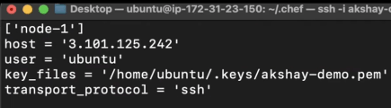
Step 1: Define Target Credentials
Target_credentials file is defined in the .chef directory. This file contains connection details for remote nodes. Once the file is configured, the agentless run is executed on the specified machine.
Users can add multiple entries to this file to suit different scenarios according to their requirements.
Configure client.rb
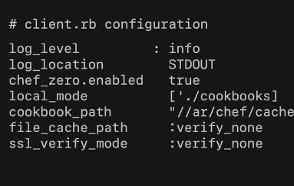
Configure the client.rb file, associated with one target machine (1–1 mapping), before executing the agentless run. This file is critical as it defines how Chef Infra Client behaves during the run, including paths, logging and SSL settings.
As a best practice client.rb file is in the .chef directory of the host. It maintains Chef Zero mode works correctly and points to the right cookbook and cache paths for an agentless setup.
Recommended settings for agentless runs:
- log_level: Sets verbosity of logs (use: info for standard runs)
- chef_zero.enabled: Enables Chef Zero for local mode execution
- local_mode: Helps the client run without a Chef Server
- cookbook_path: Points to your local cookbook directory
- file_cache_path: Temporary storage for files during the run
- ssl_verify_mode: :verify_none disables SSL verification
For managing multiple nodes, create separate client.rb files or use a consolidated credentials file. Each client.rb file should define node-specific configurations such as log location, SSL settings and authentication details.
When a client run happens, Chef generates a ‘GUID’ (Globally Unique Identifier) for the remote node. This GUID is a persistent, unique ID that Chef uses to track runs and report them accurately in Chef Automate.
In an agentless setup, if you have multiple machines, you must create multiple entries in target_credential and maintain a separate folder with a unique client.rb file for each machine. Without this, only the latest GUID will be picked up and updated in Automate, leaving the UI with a single node entry instead of multiple.
Once the GUID is generated, the Chef solution does not create a new one as the chef_guid file already exists; it overwrites previous data while retaining the same GUID.
Each client.rb should define node-specific configurations such as log location, SSL settings and authentication details.
Example snippet:
log_location '/var/log/chef-client.log'
chef_server_url 'https://chef-server.example.com'
node_name 'node1'
Supports storing these files securely and referencing them correctly during agentless runs.
Step 2: Create the Cookbook
Create a new cookbook using command:
$ chef generate cookbook <cookbook_name>
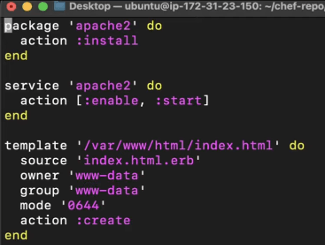
Inside the cookbook, create a recipe that:
- Installs the web server
- Enables and starts the service
- Uses a template resource to render a custom webpage
The recipe from the cookbook will be executed on node1.
Step 3: Custom Resource for Webpage
The custom resource creates the webpage on the remote machine. When executed, it connects to the target system, installs the webpage file at the specified path and fills it with the given content, such as an HTML message or demo page.
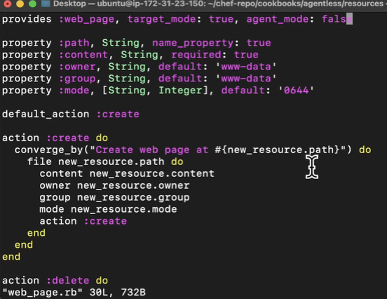
This confirms:
- Correct ownership and permissions
- HTML content is deployed properly
Built-In Resources with Chef
The Chef solution comes with a rich set of built-in resources; ready-to-use building blocks for common tasks such as installing packages, managing services, creating files and deploying templates. These resources save time, reduce complexity and keep consistency in automation.
Built-in resources are used to call a Chef resource instead of writing custom scripts leading to faster development, fewer errors and predictable results.
Some of the popular resources are:
- package: Install or remove software packages
- service: Start, stop or enable system services
- file: Create or delete files with specific permissions
- template: Deploy configuration files using ERB templates
- user/group: Manage system users and groups
Step 4: Execute Agentless
The Chef client is executed on the remote machine. Users can either make use of a run list or specify the cookbook path for execution.
Command: chef-client -z -t node1 –r'recipe[agentless_demo::default]
In the screenshot below:
- ‘-z’ indicates the Chef Zero (local mode)
- '-t node1’ indicates the target node from the credentials file
- ‘-r’ indicates the runlist specifying the recipe
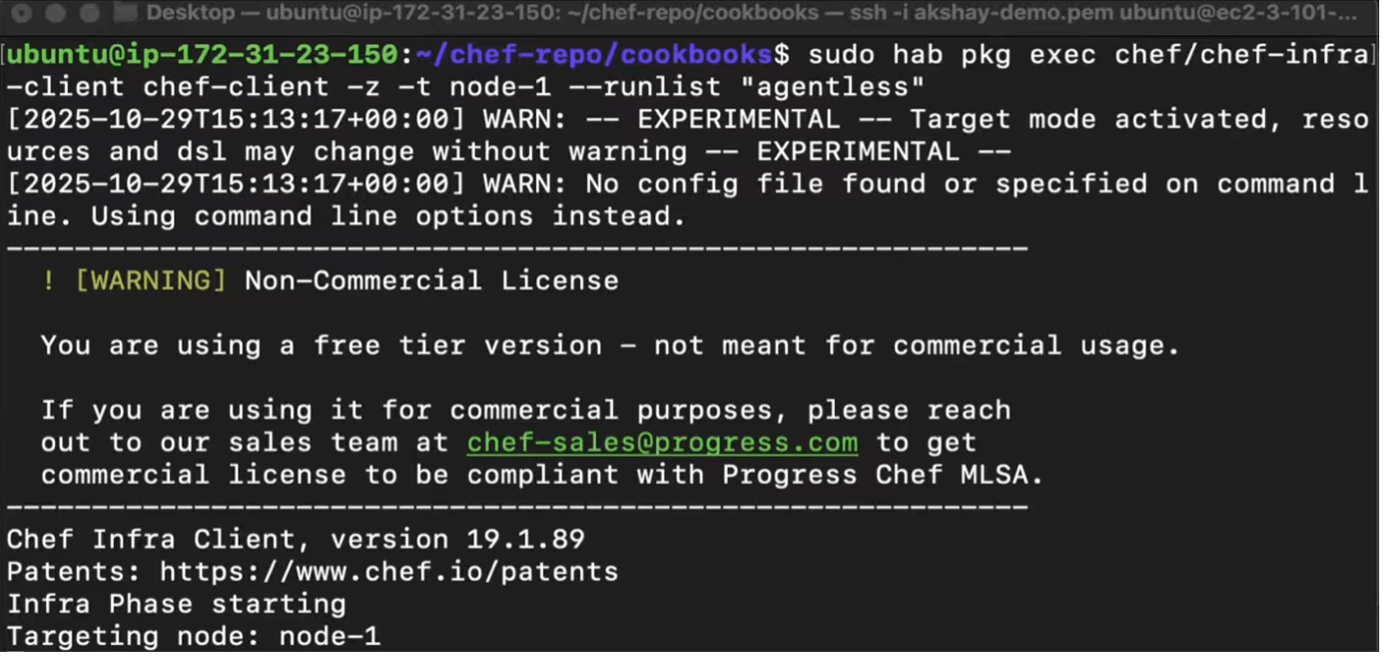
The execution takes a few seconds to complete and the results are seen both in the browser and in the terminal.
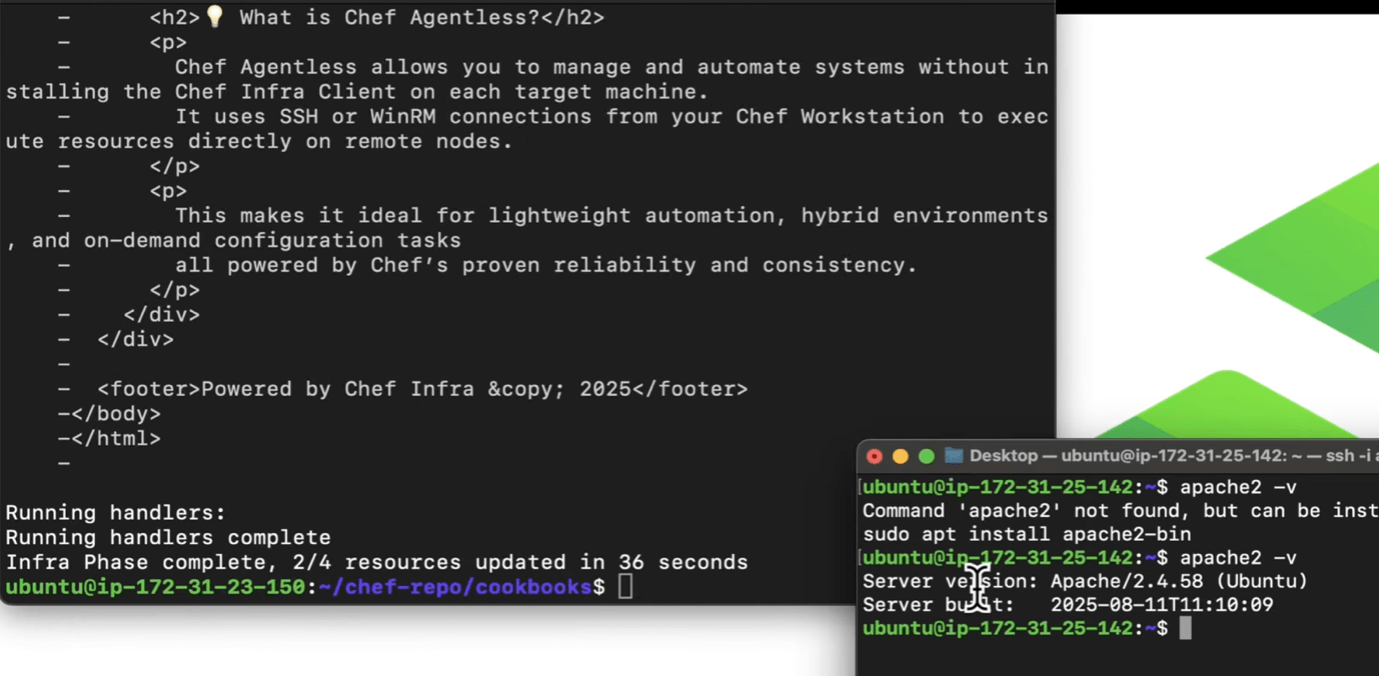
Verify:
- Apache is running
- Custom webpage is served
The latest Chef Client 19 release introduces enhanced resources, empowering users to build custom solutions tailored to infrastructure requirements.
Chef 19 provides several built-in resources such as; package, service, template, file, user and group
Learn more about resources here.
Conclusion
Agentless execution with the Chef solution delivers automation when agents cannot be installed as in the case of edge devices. Using secure remote connectivity and temporary client runs, teams can maintain compliance and scale efficiently.
Learn more about Agentless execution here.

